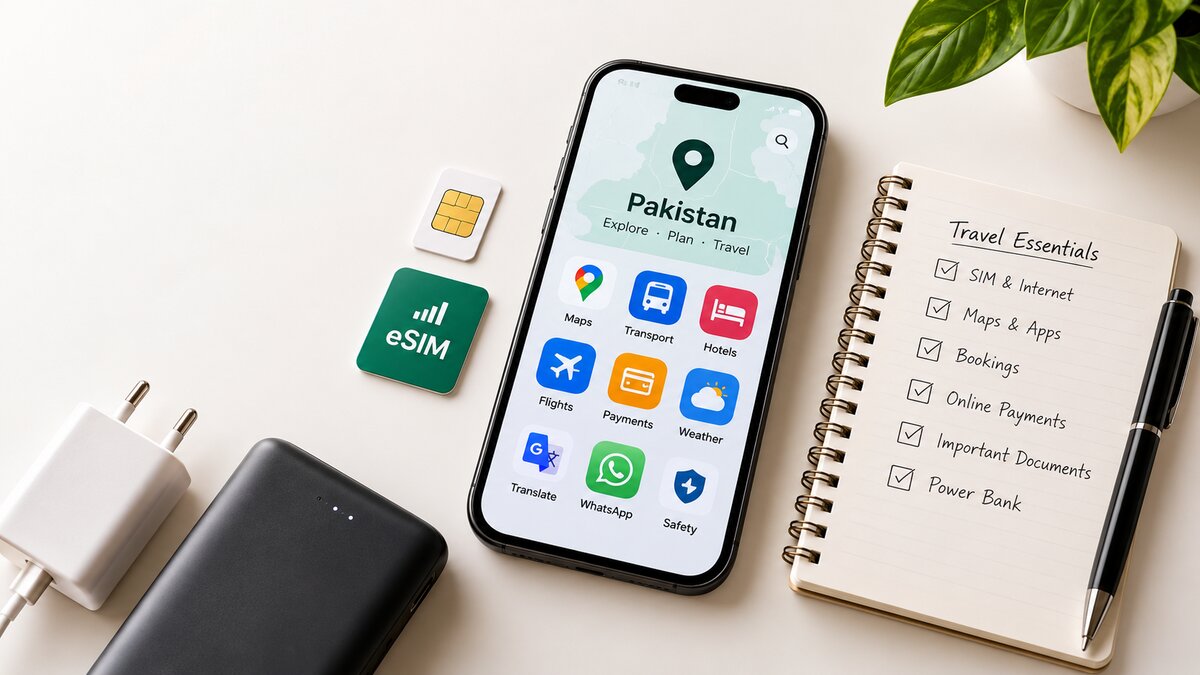
The digital travel essentials for Pakistan are a working mobile connection (local SIM, eSIM or roaming), offline maps, a few trusted transport and booking apps, a mix of cards and cash, and secure backups of your documents. Sort these out before you leave and you will navigate, book and pay with far less stress, whether you live in Karachi, are visiting family from overseas, or are landing in Islamabad for the first time.
This guide covers Travelling Pakistani's practical approach to staying connected while travelling in Pakistan. Rules, apps and payment options change, so we point out where you should check current information with the provider.
What Digital Essentials Do You Need Before Travelling in Pakistan?
At minimum, set up seven things before departure:
- Connectivity: a local SIM, an eSIM or an international roaming plan.
- Navigation: offline maps with your hotel and key places saved.
- Transport: ride-hailing apps and official bus or railway booking channels.
- Accommodation: confirmed bookings saved where you can read them without internet.
- Payments: a bank card, banking app access and enough Pakistani rupees in cash.
- Documents: secure copies of your passport, visa, insurance and bookings.
- Security: screen locks, two-factor authentication and a power bank.
SIM Cards and Mobile Internet in Pakistan
Mobile internet in Pakistan is widely available in cities and along major routes, but it gets patchy in mountain valleys and remote northern areas. Plan for gaps rather than assuming a signal everywhere.
What are my options for a SIM card in Pakistan?
- Pakistani residents: keep your current SIM, and check that your operator's data package covers the areas you will visit.
- Overseas Pakistanis: you can use roaming from your home network, buy a local SIM, or in some cases use an eSIM. Local SIM purchases are generally tied to identity verification, so carry your original identity documents (such as a NICOP) and expect a fingerprint check.
- International visitors: options include roaming on your home SIM, a travel eSIM bought before you fly, or a local SIM bought in person. Foreign visitors are generally asked for an original passport and a valid visa.
Registration, identification and activation rules can change, and telecom regulators have been reviewing roaming rules. Check the current requirements on your chosen operator's official website, or visit one of its service centres, before you rely on any plan. Buying from an official franchise or service centre is safer than from a street seller, because your fingerprint data is used to register the SIM in your name.
Can I use an eSIM while travelling in Pakistan?
Often yes, but it depends on your phone and the provider. Your phone must be eSIM-compatible and network-unlocked. On most phones, dialling *#06# shows an EID number if eSIM is supported. Travel eSIMs sold by international providers usually need no local verification, but coverage and speeds depend on the local partner network, so read the provider's Pakistan details first. Some local operators also offer eSIMs, with their own identity checks and device requirements.
How should I compare data packages?
Do not compare headline prices alone. Check the data allowance, how many days the package stays valid, whether data resets daily or lasts the whole period, and whether the provider lists coverage for the regions you plan to visit. We are not quoting prices here because they change; use each operator's official tariff page.
Tip: arrange connectivity before you rely on maps or ride-hailing. Without data on arrival, even finding your hotel or booking a ride becomes harder.
Best Apps for Travelling in Pakistan
These are categories that most travellers find useful. Availability and acceptance vary by city, so treat each as a starting point rather than a guarantee.
- Navigation and maps: Google Maps is the common choice. Organic Maps is a free offline-first alternative worth installing as a backup.
- Local transport: ride-hailing apps operate in many larger cities. Check which services currently run in your destination and compare them with local taxis. For intercity travel, use the official websites or apps of railway and bus operators rather than third-party resellers.
- Accommodation and flights: use reputable booking platforms or book directly on a hotel's or airline's own website.
- Communication: WhatsApp is widely used in Pakistan by hotels, drivers and tour operators.
- Weather: a reputable weather app plus the official forecast from the Pakistan Meteorological Department. This matters most in the mountains, where conditions affect road access.
- Translation: Google Translate supports Urdu, and its offline language packs help when signal drops.
- Banking and payments: your own bank's official app, and any payment service you are eligible to use.
Download apps only from the official Apple App Store or Google Play Store. Avoid unofficial APK files, which can carry malware.
Ready to plan where to go? Browse the Travelling Pakistani destination guides to choose your next stop.
How to Use Offline Maps in Pakistan
Offline maps are one of the most useful digital travel tips for Pakistan, especially on mountain roads where signal drops without warning.
- Download maps on Wi-Fi before departure. In Google Maps, search a city or region, open its menu and choose to download an offline map. Organic Maps lets you download whole regions.
- Save key locations. Star or pin your hotel, bus stands, railway stations, meeting points and fuel stops.
- Screenshot directions for important legs as a backup.
- Save addresses in Urdu where possible, so you can show a driver.
- Save battery. Use airplane mode in dead zones and lower screen brightness. Carry a power bank.
Offline maps usually do not include live traffic, recent road closures or landslide updates, and they may be incomplete for remote trails and minor roads. Ask locals, your hotel or your driver about current road conditions before setting off.
Online Payments, Cash and Banking Apps
Online payments in Pakistan for tourists are improving, but acceptance varies by merchant, city and service. Treat digital payment as a convenience, not a plan.
- Carry rupees. Cash is still the practical option for small shops, markets, local transport, rural areas and times when connectivity fails.
- Use cards where accepted. Larger hotels, restaurants and shops in major cities are more likely to accept cards. Smaller businesses may not.
- Check with your bank. Ask about international transaction fees and whether you need to notify them of your trip to avoid blocked cards.
- Use legitimate apps only. Never share your PIN or one-time passwords with anyone, including people claiming to be from your bank.
- Know the limits of local wallets. Mobile wallets and local payment services may require a Pakistani CNIC, a local phone number or local registration, so tourists may not be able to use them.
Withdrawing cash from ATMs is another option, but availability and limits vary, so do not depend on one machine or one card.
Book Transport and Accommodation Safely Online
- Use the official website and check the web address carefully. Be wary of links sent by strangers or social media pages.
- Read the cancellation policy and the full price before paying.
- Check passenger details match your passport or ID exactly.
- Be sceptical of unusually cheap offers, especially those asking for payment outside the platform.
- Save everything. Keep confirmation emails, booking references and the provider's phone number available offline, as screenshots or a PDF.
For help planning costs, read about travelling Pakistan on a budget on Travelling Pakistani.
Digital Safety Tips for Travellers in Pakistan
- Use a strong passcode and biometric lock on your phone.
- Turn on two-factor authentication for email, banking and booking accounts, and use a password manager.
- Avoid banking or entering card details on public Wi-Fi. Use mobile data instead.
- A VPN can add protection on public networks. VPN rules in Pakistan have been evolving, so check the current legal position before you travel and choose a reputable provider.
- Keep your phone's software and apps up to date.
- Back up your passport, visa, insurance and bookings in secure cloud storage, and keep an offline copy.
- Avoid posting your live location or detailed itinerary publicly.
- Enable Find My Device (Android) or Find My (iPhone) and know how to lock a lost phone remotely.
- Watch for phishing messages and fake booking pages that ask for urgent payment or login details.
Your Pakistan Digital Travel Checklist
- Connectivity: SIM, eSIM or roaming confirmed and tested.
- Offline maps downloaded, with hotel and key places saved.
- Transport and hotel confirmations saved offline.
- Weather, messaging and translation apps installed.
- Bank card checked, banking app working, rupees in cash.
- Document backups and emergency contacts saved.
- Charger, cables and a power bank packed.
- Passcode, two-factor authentication and phone tracking turned on.
Frequently Asked Questions
Do tourists need a local SIM card in Pakistan?
Not always. Roaming on your home SIM or a travel eSIM can work, though cost and coverage vary. A local SIM can be useful for longer stays but usually requires identity verification at an official outlet. Check your operator's current requirements before you travel.
Can I use an eSIM while travelling in Pakistan?
Often, if your phone is eSIM-compatible and unlocked. Travel eSIMs generally need no local verification, while local operator eSIMs may require identity checks. Coverage depends on the partner network, so read the provider's Pakistan details first.
Which apps are useful for travelling in Pakistan?
Useful categories are maps (Google Maps, Organic Maps), ride-hailing, official bus and rail booking channels, WhatsApp, a weather app, Google Translate and your bank's app. Availability differs by city, so check what operates in your destination.
Can I use Google Maps offline in Pakistan?
Yes, you can download areas in Google Maps over Wi-Fi and use them without data. Offline mode lacks live traffic and may be missing newer roads or remote trails, so confirm road conditions locally.
Can tourists pay digitally in Pakistan, or should they carry cash?
Both. Cards and digital payments are accepted in many hotels and larger shops, but not everywhere. Carry rupees for markets, local transport and small businesses, and do not rely on a single payment method.
Travel Pakistan with Confidence
A little digital preparation goes a long way: a reliable connection, offline maps, safe booking habits, a mix of cash and cards, and backups of your key documents. None of it is complicated, and it lets you spend more time enjoying the trip. If this is your first visit, read our Ultimate Beginner's Guide to Traveling in Pakistan.
Use the checklist above as your Pakistan travel starter checklist, and share this article with someone planning a trip to Pakistan.




0 Comments
Be the first to share your thoughts.
Leave a Comment
Your email address will not be published. Comments are reviewed before they appear.